

Weather Radar - Meteored News
Meteored
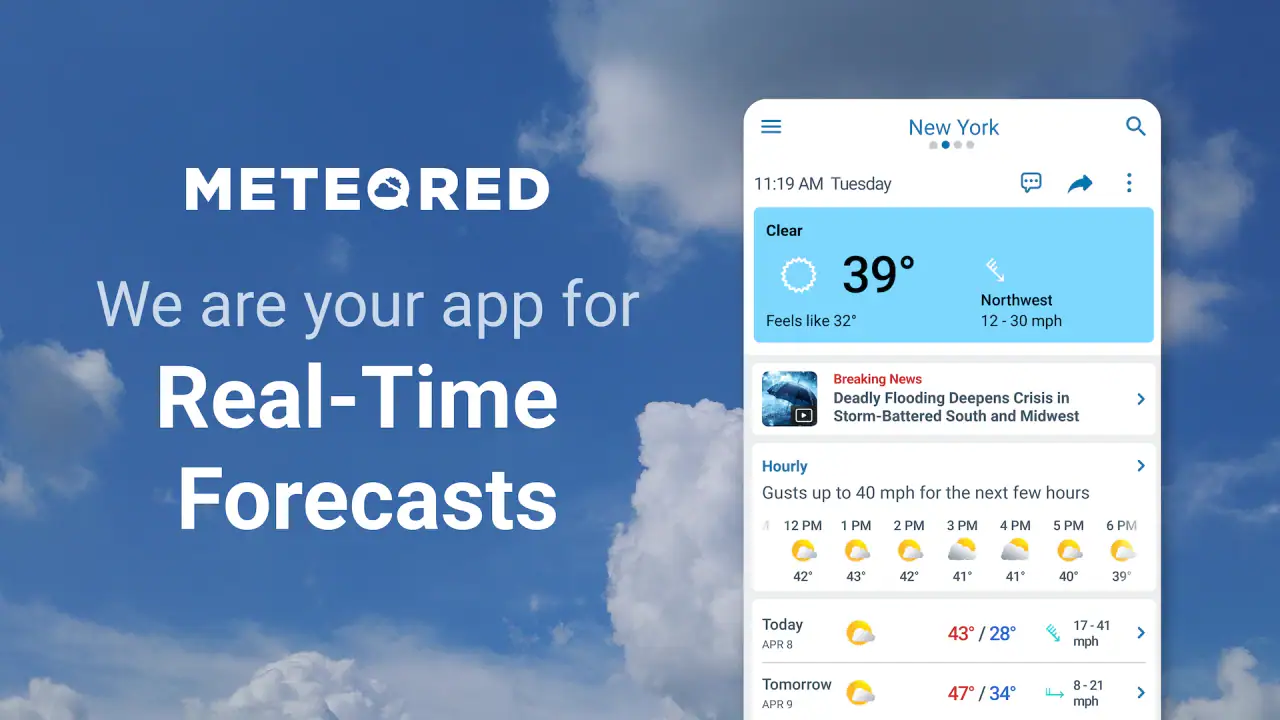
I use weather apps for very ordinary decisions: whether to cycle to work, when to leave for an appointment, and whether a weekend plan needs a backup. Weather Radar - Meteored News is built for those moments, but it tries to cover more than a simple temperature screen. It combines forecasts with radar, alerts, storm tracking, hurricane information, and weather-related news, so I found it more useful when I wanted to understand changing conditions rather than glance at one number.
The app comes from Meteored, a developer that has been working in this category since the app’s release on April 3, 2012. It is free to install, available for everyone, and supports Android 8.0 or later. The current version is 8.10.0_free. Its popularity is easy to understand: it has passed 50 million installs and holds an average rating of 4.8 from around 2.7 million ratings, with roughly 9,400 written reviews. Those figures suggest a mature, widely used weather tool, although popularity alone is not a guarantee that its presentation will suit every person.
What makes Weather Radar - Meteored News worth trusting?
My first impression is that this is not just a decorative forecast app. The useful distinction is that it gives me several ways to check the same developing situation. A daily forecast can tell me that rain is likely, while radar can help me judge whether precipitation is approaching my area now. Storm and hurricane tracking add another layer for people who need to follow a larger weather system over time.
Related News
That combination matters because forecast confidence changes with the time window. I would trust a near-term radar view more for deciding whether to walk outside in the next hour, while a multi-day forecast is better for broad planning. The app does not remove that uncertainty, but it makes the difference between “rain is possible later” and “a rain band appears to be moving toward me” easier to see.
I also like the inclusion of trending weather news. News can add context to an unusual event, especially when a storm affects a wider region. At the same time, I would not treat a news card as a substitute for an official warning. For safety decisions, I would compare what I see in the app with local authorities and emergency services. That is not a criticism unique to Meteored; it is a sensible habit with every consumer weather service.
Related News

Instagram Is No Longer a Photo App. It Is an Attention Engine

Microsoft Teams Mobile: When Collaboration Becomes Navigation

How the NFL App Adapts to Android and iOS Updates

Temu: Elevate Your Shopping Experience to Billionaire Status

Why Traffic Rider Works Best as a Precision Reflex Game

How Google’s Find Hub Transforms Everyday Searches
The app’s strong reputation gives it a reassuring starting point, but my trust comes more from how I use its different views than from the rating. A forecast is most helpful when I can inspect the timing, look at the radar, and decide how much confidence is reasonable. The practical strength here is not certainty; it is giving me more context before I act.
Permissions, privacy, and the importance of checking choices
Weather apps naturally invite questions about location and personal information. A local forecast is more convenient when the app knows where I am, but I do not want convenience to become an automatic reason to share more than necessary. I make a point of reviewing the permission choices on my device instead of accepting every request without reading it.
That approach is especially useful when I am traveling. For a short trip, I may prefer to search for a destination manually rather than keep continuous location access enabled. For daily use, I can decide whether automatic location is worth the convenience of opening the app and immediately seeing local conditions. The important point is that the decision should remain mine, based on how often I need automatic updates.
Gallery
I also check the app’s visible privacy and account controls before settling into a routine. If I use optional alerts, saved places, or personalization, I want to understand which choices are active and how to change them later. I do not assume that a weather app needs every possible permission simply because it offers local forecasts. The safest habit is to grant only what supports the feature I actually intend to use.
My review of trust is therefore deliberately practical: I look for clear choices, manageable notifications, and the ability to use the service without surrendering unnecessary control. I would not describe any weather app as automatically private just because its main purpose is harmless. Weather data can still reveal routines when combined with location and alert behavior, so I prefer a restrained setup.
How I use the radar instead of relying on a single forecast
The radar is the feature I return to when the forecast feels too general. Before leaving home, I can check whether the rain shown in the hourly outlook is already nearby or still well away. This is a small but valuable workflow: first read the expected conditions, then use the radar to judge immediacy, and finally decide whether I need a coat, a different route, or more time.
One non-obvious benefit is that radar changes how I interpret short forecasts. A rain icon covering several hours can look discouraging, but the radar may show a brief passing area rather than continuous rain. Conversely, a quiet moment outside does not prove that the rest of the trip will stay dry. I use the moving pattern as a planning aid, not as a promise.
For a realistic everyday example, imagine I am taking a train and walking the final part of the journey. I would check the hourly forecast in the morning, then open the radar shortly before leaving. If precipitation appears to be approaching the station, I might delay a few minutes or carry an umbrella. If the radar is quiet but the forecast still shows a later shower, I can leave normally while keeping a backup plan. This is more useful than repeatedly refreshing the temperature.
The same method works for outdoor exercise. I can compare the expected temperature and wind with the radar, then choose a shorter route if conditions look unsettled. People who organize outdoor work may find this especially helpful, although they should still use local warnings for serious weather and avoid treating a consumer display as a professional safety instrument.
Storm and hurricane tracking: useful context, not a substitute for warnings
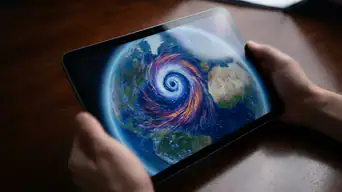
The storm and hurricane tools give the app a broader purpose than a standard local forecast. I can follow a developing system and keep its movement in view instead of checking scattered headlines. This is valuable for relatives, travelers, and residents who want a simple overview of how a major event may affect a region.
There is a trade-off, though. Tracking information can create a false sense of precision when a storm’s path or intensity is still changing. I would use the app to understand the situation and decide when to consult official guidance, not to make evacuation or shelter decisions by myself. The best workflow is to use Meteored for accessible monitoring and official agencies for instructions that affect personal safety.
Alerts deserve the same careful treatment. I prefer enabling only the notifications that I am likely to act on, because too many warnings can become background noise. A useful alert should prompt me to check the details, not encourage me to panic. After a few days, I would review which notifications were genuinely helpful and turn off anything repetitive or irrelevant to my location.
For someone living far from hurricane zones, these features may be unnecessary and add visual weight. For someone who travels often or has family in affected areas, they can make the app more worthwhile. This is one of the clearest cases where the right choice depends on how much weather information a person actually needs.
News, forecasts, and the risk of information overload
The news section is a useful addition when weather becomes a story rather than a background detail. It can help explain why conditions are unusual and provide a wider view than the local forecast. I appreciate that context when I want to understand a heat event, storm, or regional disruption instead of simply seeing an icon.
Still, I would not open the app expecting a quiet, minimalist experience. Combining forecasts, radar, alerts, tracking, and news means there is more to scan. Someone who wants only today’s temperature may find the extra material distracting. A simpler built-in phone weather widget can be better for quick checks, while Meteored is more suitable when I am willing to explore the situation.
My advice is to build a personal routine rather than consume every panel. I start with the local forecast, move to radar only when timing matters, and open news or storm tracking when there is a genuine regional event. That keeps the app useful without turning a basic decision into a long browsing session.
Free access, optional purchases, and everyday usability
The free version makes the app easy to try, which is important for a weather service because people often need to compare presentation before committing to one. Optional in-app purchases range from $0.99 to $7.99 per item. I would treat those purchases as a choice rather than part of the basic reason to install it. The free entry point is enough to decide whether the forecasts, radar, and alert style fit my habits.
Before paying for anything, I would use the app through several weather changes: a normal dry day, a rainy commute, and a more unsettled period. That gives me a better sense of whether the extra value is real for me. A person who checks weather once each morning may never need an upgrade, while someone who follows storms closely may place more value on additional convenience.
The age rating of Everyone also makes the app broadly approachable for households. That does not mean every setting is automatically ideal for every family member. I would still help younger users understand that a forecast is an estimate and that severe-weather decisions belong with adults and official instructions.
Who should choose it, and who should look elsewhere?
I would recommend Weather Radar - Meteored News to people who want more than a temperature and a rain icon. It is a strong fit for commuters, travelers, outdoor hobbyists, and anyone who likes checking radar before making a short-term decision. It is also useful for people who want local conditions alongside a broader view of storms and weather news.
I would be more cautious about recommending it to someone who wants an almost invisible utility. If the only requirement is a glance at the current temperature from a home-screen widget, the phone’s built-in weather option may be faster and less demanding. Likewise, people who need specialized professional meteorological tools should look for services designed for that purpose rather than relying on a general consumer app.
Privacy-conscious users should not skip the app automatically, but they should configure it deliberately. Manual locations may be preferable to continuous location access, and notification settings deserve a review. I also would not install it solely for emergency protection. Its storm information can improve awareness, but official alerts and local authorities remain more important when conditions become dangerous.
My final view after using its main tools
Weather Radar - Meteored News succeeds because it connects several practical weather tasks in one place. I can check a forecast, inspect approaching precipitation, follow a larger storm, and read context about unusual conditions. The app feels most valuable when I use those tools selectively rather than treating every screen as equally important.
Its limitations are mainly about focus and judgment. The amount of information may be excessive for a person who wants a single number, and radar or tracking visuals can be overinterpreted if I forget that weather changes. Notifications also need personal adjustment, particularly for anyone who dislikes interruptions or wants to minimize location-related sharing.
After considering its free access, broad compatibility, mature history, and large user base, I see it as a dependable general-purpose option rather than a replacement for official emergency services or specialist forecasting software. Meteored has made a thoughtful choice by putting radar and changing conditions near the center of the experience. If you want weather information that helps you decide what to do next, not merely what the temperature is, this is an app I would recommend trying.
My cautious verdict is simple: install it if radar, alerts, storm context, and flexible location checks matter in your routine. Configure permissions and notifications before relying on it, test the free experience during real weather, and keep official sources close for serious events. Used that way, it becomes a practical companion without asking me to confuse convenience with certainty.
FAQs for Weather Radar - Meteored News
What features does Weather Radar - Meteored News offer?
Weather Radar - Meteored News provides real-time weather updates, interactive radar maps, and customizable weather alerts. Users can access detailed forecasts including temperature, precipitation, wind speed, and UV index. The app also offers weather news and articles, making it a comprehensive tool for staying informed about weather conditions.
Is Weather Radar - Meteored News free to use?
Yes, Weather Radar - Meteored News is free to download and use. However, it may offer in-app purchases or subscriptions for additional features or to remove ads. Users should check the app store listing for details on any potential costs associated with premium services.
How accurate is the weather information provided by this app?
Weather Radar - Meteored News uses data from trusted meteorological sources to provide accurate forecasts. While the app strives for precision, weather predictions can vary due to changing conditions. It’s recommended to regularly check updates for the most current information, especially for planning outdoor activities.
Can I customize the weather alerts in the app?
Yes, Weather Radar - Meteored News allows users to customize alerts based on personal preferences. You can set notifications for specific weather conditions like rain, storms, or severe weather events in your area. This feature helps users stay prepared by receiving timely updates directly to their device.
Does the app provide international weather coverage?
Weather Radar - Meteored News offers international weather coverage, making it useful for travelers and those monitoring weather conditions in different locations. Users can input various cities or regions to receive forecasts and alerts, ensuring a global reach for weather information.
Pros
- Accurate real-time weather updates.
- User-friendly and intuitive interface.
- Customizable alert settings.
- Detailed radar and satellite images.
- Covers global weather conditions.
Cons
- Some features require a premium subscription.
- Occasional ads can be intrusive.
- Initial setup can be time-consuming.
- High data usage for detailed maps.
- Limited offline functionality.


